Showing posts with label learning. Show all posts

Monday, November 12, 2012

Animoto


Digital stories can be made on several different websites.  Most of the storytelling websites cost money, but some let you create short clips for freeThe website that was used to create this digital slideshow was Animoto.   The website and directions were very clear and had many different options to choose pictures and music from.   


In the video I created, A Day in Madrid, I showed my viewers some different sites around the city of Madrid, Spain.  I could definitely imagine using this in my classes to show my students architecture, historic places, and culture of different places in the world.   This seems like a great way to organize pictures and show them in a fun and engaging manner.  In the language classroom, you could introduce different units with photographs, music, and text from different themes or places in the world.  Students could also create different slide shows using Animoto or a similar site that could allow them to be creative in bringing their ideas to life.  Animoto could be an alternative to PowerPoint, field trips, or digital storytelling.  It can also enhance work the students may already be doing, such as science projects or book reports.  Students with limited English skills could also create a video to introduce themselves to me and / or the class.  It is important to note, however, that many English language Learners and refugee students do not always have access to digital photos or even the internet.  This might be an activity that the teacher would have to bring the students to the school's computer lab to do.  The teacher and computer lab instructor could help students find images on a site like Flickr or through some sort of clip art.  The teacher could also ask students to bring in any photos and they could be scanned on to the computers.  Technology is such a good tool to use with ELLs, but accommodations must be considered before assuming all of your students have the ability to use these tools.  In this way it could possibly have the added bonus of teaching students how to use technology.   


How have you used sites like Animoto in the classroom?  What did you do and how did it go?

Sunday, November 11, 2012

Exploring VoiceThread


VoiceThread is a collaborative, multimedia web-based application that allows you to place collections of media like images, videos, documents, and presentations at the center of a conversation. A VoiceThread allows people to have conversations and to make comments by annotating the original artifact using any mix of text, audio, and video. VoiceThread runs inside your web browser, so there is no software to download, install, or update. It can be an easy way to differentiate instruction while providing engaging choices to "show" learning, engage in conversation, and think openly and critically about content.


I think that VoiceThread can be a useful tool for getting students to use the language in a variety of ways….listening, speaking, reading, and writing. The tasks could be created to use for practice or as a formative or summative assessment. It also allows the students to benefit from hearing and seeing other students’ work as well as being able to give each other feedback and interact with each other using the language.


The two VoiceThread posts I chose to comment on were Wen’s and Alyssa’s. Both of these VoiceThreads allowed the students to practice their speaking skills. In Alyssa’s task, the students viewed a picture and described what the characters were doing using the present progressive tense. In this way, she could get an idea about whether the students have mastered the use of this form. I could see her task being used as a practice activity or a formative assessment. Wen’s activity integrates content and language. The students need to know something about healthy eating to be able to answer the question. I thought these were both good ways of engaging the students in using the language and being able to assess their language skills. I definitely think that VoiceThread is something that I will incorporate into my classroom.


I'd love to hear any ideas you might have for incorporating VoiceThread into the classroom as well!

Tuesday, October 16, 2012

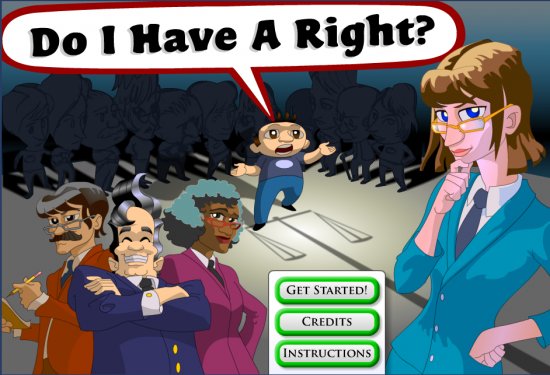
Do I Have a Right?


One game that I might have students  play at home for autonomous learning and to reinforce what they are doing in school would be the Bill of Rights game “Do I Have a Right?” which I found on the  GameChange website.  This game would be categorized as a serious game. Serious Games are computer and video games that are intended to not only entertain users, but have additional purposes such as education and training.  I think that this game reinforces and teaches about the bill of rights and constitutional law.  I played this game about three or four times and really felt that it helped teach what rights are contained in the Bill of Rights and other constitutional amendments.  


 In the game, students manage a law firm staffed with lawyers who specialize in constitutional law and must decide whether each visiting client “has a right” after reading about the client's problem or issue.   If so, students match the client with a lawyer who specializes in the relevant constitutional amendment. 


 Students grow their law  firms over a series of 8-hour “days”. Their successes increase the lawyers’ number of specializations and earn them points to hire more lawyers and buy a variety of amenities to keep waiting clients happy


But the clock is ticking, and students have to learn their amendments fast if they want to keep winning cases and stop clients from walking out.   


 As additional learning features, the game allows students to click on relevant information in the client descriptions and awards points when the students find information that is relevant to the problem.


Also, at the end of each day (or round), a newspaper appears that summarizes the successes and failures of the day.  This provides additional reinforcement of what students are learning and practicing while playing the game.


The learning objectives for this game would be:

  • The students will be able to distinguish which issues are rights and which are not based on a written description.
  • The students will be able to identify which part of the bill of rights gives them that right.  

 This could be assessed with a teacher created quiz based on the scenarios in the game or a matching quiz.  The game also has a feature whereby if the students are signed in to the game, they can see a final score breakdown.  From there, students can view and print a detailed report that will let the teacher determine how students performed on each specific amendment.


One of the nice things about the game is that  although students with some background and familiarity with constitutional rights may find it easier to play, "Do I Have a Right?", it also teaches the constitutional amendments, so even those who don't know much about the Bill of Rights can play and learn!


Monday, October 15, 2012

Video Games in the Classroom: A Very Time-Consuming Endeavor

According to a wiki at gamification.org, “gamification typically involves applying game design thinking to non-game applications to make them more fun and engaging”.  In other words, gamification is making a game out of something that normally is not thought of as a game to make it more interesting and engaging for the learner or user. 


 For some time I have thought that making something into a game, electronic or otherwise,  can be an excellent tool for motivating students.  I have often played games or converted classroom activities and more traditional 'worksheet' activities into games when I was teaching.   For video games, the instant feedback and rewards for mastery as well as the automatic increase of the level of challenge are an important element of video games which, if able to be incorporated into a game where students were learning the language, could make for an engaging and valuable learning experience. Several of the articles and videos from this week seem to suggest this as well. 

  
I would love to find a game, and have searched for one in the past as well as this week, that combines these elements and also helped with language learning.    The problem is, I don’t think there are many games that provide a rich enough language experience to truly be used for anything other than enrichment outside of the classroom.   One of the main reasons for this is that many of the games also take a while to play and so they don’t always seem like an efficient use of class time.  They also take a while to figure out so by the time you figure out how to play the game and are actually getting something out of it, several class periods have gone by.  This week I have literally spent  hours trying out different games from our assignment sheet  to see if there are any I would use and honestly, I cannot say that I would use any of them in the classroom.  I played many games at games for change (many of which I enjoyed), Third World Farmer, The McDonald's Game, Against All Odds, Budget Hero, The Garbage GameDarfur is Dying,  and several of the point and click and escape the room games.

Although many of the the games are engaging and interesting and I’m sure the students would enjoy playing them, I just don’t see spending that much class time for the amount of language learning that would happen, especially language learning that I could actually evaluate.  Some of the suggested games, such as Pac-Man seem to be truly a waste of time in terms of language learning even though they are fun to play.  A few of the other games could maybe be used and would provide language practice and interaction, but to me they seem much less efficient than typical classroom activities and so I don’t see myself using them for anything other than enrichment for students to do on their own time or for rare occasions when one or two students finish work early.  A few of the games were also obviously made by non-native English speakers and  had incorrect or awkward English grammar and vocabulary, which I would not want to use with the students.

Although it may not seem like it based upon this post, I actually am not completely anti-video game, I have played video games on occasion and have enjoyed them,  however the ‘escape the room’  concept seems like a waste of time for a language learner or not.  The only use of them for me would be the ones in the article using the walkthrough, as a reading comprehension, listening, or partner activity.  I would only use ready-made ones, however, because I can’t imagine the boredom of having to figure out where to randomly click on a computer screen to get out of a fake room (and why someone wanted to spend the hours to do this already is beyond me).   Teachers are so busy and I can't imagine spending hours clicking on a screen to create a reading comprehension activity to use for one class period.  I would consider using one of the ready made ones especially for a day when the students had a sub or something,because it would be different for them and they would probably be engaged in it. I would consider the activity to be the walkthrough, though, and not the game itself and think that something similar could be done with a picture.  

 Maybe I am being closed-minded and there are some great uses for video games in the classroom, but gamification is something I have thought about for quite a long time and know that I would be open to something if I felt it truly provided valuable language practice in an efficient manner that students can not get in some other (and easier) way.   I would, however,  see it as a positive thing if the students played these games on their own time and would definitely encourage them to do so.  

Have you found any games to be useful and relevant in the language learning classroom?  If so, I'd love to hear about them!  Please let me know in the comments!